Robot Vacuum Simulator
A complete robot vacuum cleaner simulator demonstrating how to combine multiple xtils modules into a real-time, interactive application. The system features a client-server architecture with a browser-based visualization UI.
Overview
This example showcases:
| Module | Role in this Example |
|---|---|
| App Framework | Service lifecycle for both client and server |
| FSM | High-level robot state management (Idle → Sweeping → Charging → Paused) |
| Behavior Tree | Detailed cleaning logic with multiple sweep patterns |
| WebSocket | Real-time bidirectional communication |
| HTTP Server | REST API + static file serving for web UI |
| Logging | Structured logging throughout |
| JSON | Protocol serialization, map configuration, BT tree definitions |
System Architecture
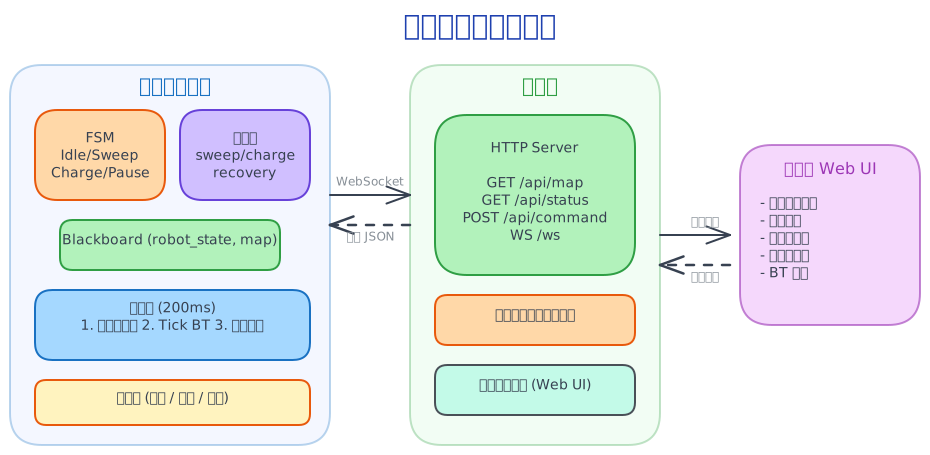
Project Structure
xtils_app/
├── CMakeLists.txt              # Root build file
├── common/
│   ├── protocol.h              # Shared types: RobotState, RobotMode, MapData
│   ├── map.h                   # Map data structures (CellType, Room, Point)
│   └── map_config.json         # Default map layout
├── client/
│   ├── CMakeLists.txt
│   ├── main.cc                 # RobotClientService (FSM + BT + WS client)
│   ├── robot_actions.h         # All BT action nodes
│   ├── sensors.h               # Sensor simulator (collision, cliff, dust)
│   ├── pathfinder.h            # A* pathfinding algorithm
│   ├── physics.h               # Physical constants (battery drain, speed)
│   └── bt_trees/               # JSON behavior tree definitions
│       ├── sweep.json
│       ├── sweep_room.json
│       ├── sweep_wall.json
│       ├── spot_clean.json
│       ├── charge.json
│       └── recovery_stuck.json
├── server/
│   ├── CMakeLists.txt
│   ├── main.cc                 # ServerService (HTTP + WS hub)
│   └── web/
│       └── index.html          # Browser UI
└── fsm_graph.dot               # Generated FSM visualization
The FSM Layer
The FSM provides high-level state management. It defines what the robot should be doing, while the behavior trees define how.
State Definitions
enum RobotEvent : fsm::EventType {
  CMD_START_SWEEP     = 1,   // User commands
  CMD_RETURN_CHARGE   = 2,
  CMD_PAUSE           = 3,
  CMD_RESUME          = 4,
  CMD_STOP            = 5,
  CMD_START_ROOM_SWEEP = 6,
  CMD_START_WALL_FOLLOW = 7,
  CMD_START_SPOT_CLEAN = 8,
  EVT_BATTERY_LOW     = 10,  // System events
  EVT_CHARGE_COMPLETE = 12,
  EVT_SWEEP_COMPLETE  = 13,
};
State Machine Setup
Each state has an enter callback that activates the appropriate behavior tree:
void SetupFSM() {
  // Register human-readable event names for debugging
  fsm_.RegisterEvent(CMD_START_SWEEP, "start_sweep");
  fsm_.RegisterEvent(CMD_RETURN_CHARGE, "return_charge");
  fsm_.RegisterEvent(CMD_PAUSE, "pause");
  fsm_.RegisterEvent(EVT_BATTERY_LOW, "battery_low");
  // ...

  fsm_.AddState("Idle", [this](const fsm::State&, fsm::EventType evt) {
    robot_state_->mode = RobotMode::Idle;
    active_tree_ = nullptr;  // No BT running in idle
    if (evt == CMD_STOP) {
      // Reset cleaned map on explicit stop
      for (auto& row : robot_state_->cleaned)
        std::fill(row.begin(), row.end(), false);
    }
  });

  fsm_.AddState("Sweeping", [this](const fsm::State&, fsm::EventType) {
    robot_state_->mode = RobotMode::Sweeping;
    // Select tree based on sweep mode (zigzag, room, wall, spot)
    std::string tree_name = "sweep";
    if (sweep_mode_ == "room") tree_name = "sweep_room";
    else if (sweep_mode_ == "wall") tree_name = "sweep_wall";
    else if (sweep_mode_ == "spot") tree_name = "spot_clean";
    SwitchTree(tree_name);
  });

  fsm_.AddState("Charging", [this](const fsm::State&, fsm::EventType) {
    robot_state_->mode = RobotMode::Returning;
    SwitchTree("charge");  // Navigate to charger, then charge
  });

  fsm_.AddState("Paused", [this](const fsm::State&, fsm::EventType) {
    robot_state_->mode = RobotMode::Paused;
    // BT is not ticked while paused
  });
}
Guarded Transitions
Guards enable conditional state transitions:
// After charging completes: resume sweep if there's work left
fsm_.AddTransition("Charging", "Sweeping", EVT_CHARGE_COMPLETE,
    fsm::MakeGuard("has_pending_sweep", [this](const fsm::State&,
        const fsm::State&, fsm::EventType) {
      return pending_task_ == "sweep" && !AllCleaned();
    }));

// Fallback: if no pending sweep, go idle
fsm_.AddTransition("Charging", "Idle", EVT_CHARGE_COMPLETE);

// Resume from pause: return to previous activity
fsm_.AddTransition("Paused", "Sweeping", CMD_RESUME,
    fsm::MakeGuard("was_sweeping", [this](const fsm::State&,
        const fsm::State&, fsm::EventType) {
      return pending_task_ == "sweep";
    }));
FSM + BT Pattern
The FSM handles transitions between modes (what to do), while behavior trees handle execution within a mode (how to do it). This separation keeps both layers simple and testable.
Graphviz Export
The FSM can export its graph for visualization:
void ExportFsmDot() {
  std::ofstream ofs("fsm_graph.dot");
  ofs << fsm_.ToDotGraph();
}
This generates a DOT file you can render with dot -Tsvg fsm_graph.dot -o fsm_graph.svg.
The Behavior Tree Layer
Behavior trees define the detailed logic for each mode. They are loaded from JSON files at runtime.
Tree Registration
// Register all custom action nodes
factory_.Register<SweepAction>("SweepAction");
factory_.Register<ReturnChargeAction>("ReturnChargeAction");
factory_.Register<ChargingAction>("ChargingAction");
factory_.Register<CheckBatteryLow>("CheckBatteryLow");
factory_.Register<StuckDetectorAction>("StuckDetectorAction");
factory_.Register<BackOffAction>("BackOffAction");
factory_.Register<RotateRandomAction>("RotateRandomAction");
factory_.Register<RoomSweepAction>("RoomSweepAction");
factory_.Register<WallFollowAction>("WallFollowAction");
factory_.Register<SpotCleanAction>("SpotCleanAction");
factory_.Register<ReadSensorsAction>("ReadSensorsAction");
factory_.Register<EmergencyStopAction>("EmergencyStopAction");
// ...

// Load all tree definitions from a directory
factory_.LoadTreesFromDirectory("./bt_trees");
Sweep Tree (sweep.json)
The main cleaning tree uses a Fallback (Selector) node: try normal sweep first, and if stuck, execute recovery:
{
  "name": "sweep",
  "root": {
    "name": "Fallback",
    "children": [
      {
        "name": "Sequence",
        "children": [
          { "name": "ReadSensorsAction" },
          { "name": "StuckDetectorAction" },
          { "name": "SweepAction" }
        ]
      },
      {
        "name": "SubTree",
        "ports": { "tree_name": "recovery_stuck" }
      }
    ]
  }
}
How it works:
ReadSensorsAction— Reads collision/cliff/dust sensors into the blackboardStuckDetectorAction— Checks if the robot has moved < 2 cells in the last 5 ticksSweepAction— A* pathfinding to nearest uncleaned cell, moves one step per tick- If stuck (StuckDetectorAction returns Failure), the Fallback triggers the recovery subtree
Charge Tree (charge.json)
Demonstrates decorator nodes (Retry + Timeout):
{
  "name": "charge",
  "root": {
    "name": "Sequence",
    "children": [
      {
        "name": "Retry",
        "ports": { "max_retries": 3 },
        "children": [
          {
            "name": "Timeout",
            "ports": { "timeout_ms": 30000 },
            "children": [
              { "name": "ReturnChargeAction" }
            ]
          }
        ]
      },
      { "name": "ChargingAction" }
    ]
  }
}
Flow: Navigate to charger (with retry on failure, 30s timeout) → Then charge until 100%.
Recovery Subtree (recovery_stuck.json)
A simple sequence for getting unstuck:
{
  "name": "recovery_stuck",
  "root": {
    "name": "Sequence",
    "children": [
      { "name": "BackOffAction" },
      { "name": "RotateRandomAction" },
      { "name": "ResetStuckFlagAction" }
    ]
  }
}
Custom Action Node Implementation
Here's how SweepAction is implemented — the core cleaning logic:
class SweepAction : public xtils::ActionNode {
 public:
  SweepAction(const std::string& name = "") : ActionNode(name) {}

  xtils::Status OnStart() override {
    path_.clear();
    path_idx_ = 0;
    return xtils::Status::Running;
  }

  xtils::Status OnTick() override {
    auto state = GetRobotState(blackboard_);
    if (!state) return xtils::Status::Failure;

    // Mark current cell as cleaned
    state->cleaned[state->y][state->x] = true;

    // If path exhausted, plan new path to nearest uncleaned cell
    if (path_idx_ >= (int)path_.size()) {
      auto map = GetMapData(blackboard_);
      if (!map) return xtils::Status::Failure;

      // Find nearest uncleaned walkable cell (Manhattan distance)
      Point target = FindNearestUncleaned(*state, *map);
      if (target.x < 0) {
        return xtils::Status::Success;  // All cells cleaned!
      }

      // A* pathfinding
      path_ = pathfinder::FindPath(*map, {state->x, state->y}, target);
      if (path_.empty()) {
        state->cleaned[target.y][target.x] = true;  // Unreachable
        return xtils::Status::Running;
      }
      path_idx_ = 1;  // Skip start position
    }

    // Move one step along path
    state->x = path_[path_idx_].x;
    state->y = path_[path_idx_].y;
    path_idx_++;

    // Drain battery
    state->battery -= physics::DRAIN_SWEEPING;
    return xtils::Status::Running;
  }

 private:
  std::vector<Point> path_;
  int path_idx_ = 0;
};
Stuck Detection & Recovery
The StuckDetectorAction monitors movement over a sliding window:
class StuckDetectorAction : public xtils::ActionNode {
  xtils::Status OnTick() override {
    auto state = GetRobotState(blackboard_);
    history_.push_back({state->x, state->y});
    if (history_.size() > 5) history_.erase(history_.begin());

    if (history_.size() < 5) return xtils::Status::Success;

    // Calculate total displacement over window
    int displacement = 0;
    for (int i = 1; i < history_.size(); i++) {
      displacement += std::abs(history_[i].x - history_[i-1].x)
                    + std::abs(history_[i].y - history_[i-1].y);
    }

    if (displacement < 2) {
      state->is_stuck = true;
      return xtils::Status::Failure;  // Triggers recovery subtree
    }
    return xtils::Status::Success;
  }
};
Blackboard Usage
The blackboard shares data between nodes and between the FSM/BT layers:
void SwitchTree(const std::string& name) {
  auto bb = std::make_shared<AnyMap>();

  // Share robot state (FSM writes mode, BT reads/writes position, battery)
  bb->set("robot_state", robot_state_);

  // Share map data (for pathfinding)
  bb->set("map", map_data_);

  // Spot clean parameters (only for spot_clean tree)
  if (name == "spot_clean") {
    bb->set("spot_x", spot_x_);
    bb->set("spot_y", spot_y_);
    bb->set("spot_radius", spot_radius_);
  }

  active_tree_ = factory_.buildFromRegisteredTree(name, bb, bt_logger_);
}
Sensor Simulation
The SensorSimulator provides realistic sensor data with noise and fault injection:
class SensorSimulator {
 public:
  SensorData Update(const MapData& map, int x, int y, bool cleaned) {
    SensorData data;

    // Collision sensor: real detection + 2% false positive rate
    bool real_collision = HasAdjacentObstacle(map, x, y);
    data.collision = collision_fault_
        ? RandomBool(0.5)   // Faulty: random output
        : real_collision || RandomBool(0.02);

    // Cliff sensor: near map edge + 1% false positive
    bool real_cliff = IsNearEdge(map, x, y);
    data.cliff = cliff_fault_
        ? RandomBool(0.5)
        : real_cliff || RandomBool(0.01);

    // Dust sensor: Gaussian noise around base level
    int base_dust = cleaned ? 10 : 80;
    std::normal_distribution<double> noise(0.0, 5.0);
    data.dust_level = std::clamp(base_dust + (int)noise(rng_), 0, 100);

    return data;
  }

  // Fault injection for testing
  void SetCollisionFault(bool fault) { collision_fault_ = fault; }
  void SetCliffFault(bool fault) { cliff_fault_ = fault; }
};
Networking Layer
WebSocket Client (Robot → Server)
The robot client connects to the server and reports state every 200ms:
void Init() override {
  // Setup WebSocket with auto-reconnect
  ws_listener_.SetCommandCallback([this](const std::string& msg) {
    HandleCommand(msg);  // Process commands from server/browser
  });

  ws_client_ = std::make_unique<WebSocketClient>(&task_runner_, &ws_listener_);
  ws_client_->SetAutoReconnect(true, 3000);  // Reconnect every 3s if disconnected
  ws_client_->Connect("ws://" + server_url_ + "/ws");

  // Main tick loop
  ctx->Every(200, [this]() {
    UpdateSensors();
    TickBehaviorTree();
    ReportState();  // Send full state as JSON via WebSocket
  });
}
HTTP Server (Serves UI + Relays Messages)
The server acts as a hub between the robot client and browser UIs:
class RobotServerHandler : public HttpRequestHandler {
  void OnHttpRequest(const HttpRequest& req) override {
    std::string path(req.uri);
    std::string method(req.method);

    // WebSocket upgrade for real-time streaming
    if (req.is_websocket_handshake && path == "/ws") {
      req.conn->UpgradeToWebsocket(req);
      ws_clients_.push_back(req.conn);
      return;
    }

    // REST API
    if (path == "/api/map" && method == "GET") {
      // Return map configuration JSON
      SendJson(req.conn, map_json_);
      return;
    }

    if (path == "/api/command" && method == "POST") {
      // Broadcast command to robot client via WebSocket
      BroadcastCommand(std::string(req.body));
      SendJson(req.conn, R"({"ok":true})");
      return;
    }

    // Static file serving for web UI
    ServeStaticFile(req, path);
  }

  void OnWebsocketMessage(const WebsocketMessage& msg) override {
    // Robot state updates → broadcast to all browser clients
    auto j = Json::parse(msg.data);
    if (j && j->has_key("mode")) {
      current_state_ = std::string(msg.data);
      BroadcastState(current_state_);
    }
  }
};
Communication Protocol
All messages are JSON. Robot state reports:
{
  "x": 5, "y": 3,
  "battery": 72,
  "mode": "sweeping",
  "sweep_mode": "zigzag",
  "sensor_collision": false,
  "sensor_cliff": false,
  "sensor_dust_level": 45,
  "is_stuck": false,
  "active_tree_name": "sweep",
  "bt_status": "running",
  "bt_events": ["Tree switched: sweep"],
  "cleaned": [0,0,1,1,1,0,...],
  "current_path": [{"x":5,"y":3},{"x":5,"y":4},{"x":6,"y":4}],
  "path_history": [{"x":3,"y":2},{"x":4,"y":2},{"x":5,"y":2}]
}
Commands from browser:
{"command": "start_sweep"}
{"command": "start_room_sweep"}
{"command": "pause"}
{"command": "resume"}
{"command": "stop"}
{"command": "start_spot_clean", "x": 5, "y": 3, "radius": 3}
Multiple Sweep Modes
The robot supports 4 sweep patterns, each with its own behavior tree:
| Mode | Tree File | Algorithm | Description |
|---|---|---|---|
| Zigzag | sweep.json | A* to nearest uncleaned | Standard sweep — finds nearest dirty cell |
| Room | sweep_room.json | Room-by-room order | Cleans one room at a time |
| Wall Follow | sweep_wall.json | Right-hand rule | Follows walls/obstacles around perimeter |
| Spot Clean | spot_clean.json | Spiral outward | Cleans a circular area around a point |
Wall Follow Algorithm
Uses the right-hand rule for perimeter cleaning:
class WallFollowAction : public xtils::ActionNode {
  xtils::Status OnTick() override {
    // Right-hand rule: try right, forward, left, u-turn
    int try_dirs[] = {
      (direction_ + 1) % 4,  // Turn right
      direction_,             // Go straight
      (direction_ + 3) % 4,  // Turn left
      (direction_ + 2) % 4   // U-turn
    };

    for (int d : try_dirs) {
      int nx = state->x + dx[d];
      int ny = state->y + dy[d];
      if (map.IsWalkable(nx, ny)) {
        state->x = nx;
        state->y = ny;
        direction_ = d;
        break;
      }
    }

    // Complete when returned to start position
    if (steps_ > 4 && state->x == start_x_ && state->y == start_y_) {
      return xtils::Status::Success;
    }
    return xtils::Status::Running;
  }
};
Spot Clean Algorithm
Spiral outward from center point:
class SpotCleanAction : public xtils::ActionNode {
  xtils::Status OnStart() override {
    // Read parameters from blackboard
    int cx = blackboard_->get<int>("spot_x").value_or(state->x);
    int cy = blackboard_->get<int>("spot_y").value_or(state->y);
    int radius = blackboard_->get<int>("spot_radius").value_or(2);

    // Build spiral path: center → layer 1 → layer 2 → ...
    BuildSpiral(cx, cy, radius, map);

    // Navigate to start of spiral via A*
    nav_path_ = pathfinder::FindPath(map, {state->x, state->y}, spiral_[0]);
    return xtils::Status::Running;
  }
};
The Main Tick Loop
The integration point where FSM, BT, sensors, and communication come together:
ctx->Every(200, [this]() {
  // 1. Update sensor readings
  UpdateSensors();

  // 2. Tick the active behavior tree
  TickBehaviorTree();

  // 3. Report state to server
  ReportState();
});
TickBehaviorTree — The Integration Logic
void TickBehaviorTree() {
  // Generate alerts based on current state
  robot_state_->alerts.clear();
  if (robot_state_->battery <= 10 && !fsm_.IsInState("Charging"))
    robot_state_->alerts.push_back("low_battery_critical");
  if (robot_state_->is_stuck)
    robot_state_->alerts.push_back("stuck");

  // Don't tick if paused or idle
  if (fsm_.IsInState("Paused") || fsm_.IsInState("Idle")) return;
  if (!active_tree_) return;

  // Tick the behavior tree
  auto status = active_tree_->tick();

  if (status == Status::Running) {
    // Auto-return on low battery during sweep
    if (fsm_.IsInState("Sweeping") && robot_state_->battery <= 20) {
      fsm_.ProcessEvent(EVT_BATTERY_LOW);
    }
    return;
  }

  // Tree completed — fire FSM events
  if (fsm_.IsInState("Sweeping")) {
    fsm_.ProcessEvent(EVT_SWEEP_COMPLETE);
  } else if (fsm_.IsInState("Charging")) {
    fsm_.ProcessEvent(EVT_CHARGE_COMPLETE);
  }
}
Map System
Maps are defined in JSON and support dynamic editing at runtime:
{
  "width": 20,
  "height": 15,
  "charger_x": 1,
  "charger_y": 1,
  "obstacles": [1,1,1,...,0,0,0,...,1,1,1],
  "rooms": [
    {"id": 1, "name": "Living Room", "x1": 1, "y1": 1, "x2": 9, "y2": 7},
    {"id": 2, "name": "Kitchen", "x1": 10, "y1": 1, "x2": 18, "y2": 7}
  ]
}
Cell types: 0 = empty (walkable), 1 = wall, 2 = furniture.
The browser UI can edit the map in real-time, and changes propagate to the robot client:
// Server handles map edits
void HandleMapUpdate(const Json& j) {
  int x = j.get_integer("x").value();
  int y = j.get_integer("y").value();
  int cell_type = j.get_integer("cell_type").value();

  map_data_.obstacles[y][x] = static_cast<CellType>(cell_type);
  map_json_ = map_data_.ToJson().dump();

  // Notify robot client
  Json update;
  update["map_update"] = Json{{"x", x}, {"y", y}, {"cell_type", cell_type}};
  BroadcastCommand(update.dump());
}
A* Pathfinding
The robot uses A* with Manhattan distance heuristic for navigation:
namespace pathfinder {

std::vector<Point> FindPath(const MapData& map, Point start, Point goal) {
  // 4-direction movement (no diagonals)
  // Manhattan distance heuristic (admissible for 4-direction)
  // Priority queue (min-heap on f = g + h)
  // Returns path including start and goal, or empty if unreachable

  auto heuristic = [&](int x, int y) -> int {
    return std::abs(x - goal.x) + std::abs(y - goal.y);
  };

  std::priority_queue<Node, std::vector<Node>, std::greater<Node>> open;
  std::unordered_map<int, int> g_score;
  std::unordered_map<int, int> parent;

  // ... standard A* implementation ...

  // Reconstruct path by following parent pointers
  std::vector<Point> path;
  int key = goal_key;
  while (key != start_key) {
    path.push_back(decode(key));
    key = parent[key];
  }
  path.push_back(start);
  std::reverse(path.begin(), path.end());
  return path;
}

}  // namespace pathfinder
Service Lifecycle
Both client and server follow the xtils Service pattern:
// Client: handles cleanup in Deinit while event loop is still running
void Deinit() override {
  if (ws_client_ && ws_client_->IsConnected()) {
    ws_client_->Close();  // WebSocket close handshake needs event loop!
  }
}

// Server: stops HTTP server gracefully
void Deinit() override {
  if (server_) server_->Stop();
}
WARNING
Deinit() is called before the event loop stops. This is critical for the WebSocket close handshake — it requires the event loop to send/receive the close frame.
Running the Example
# From xtils_app directory
cmake -B build -DCMAKE_BUILD_TYPE=Debug
cmake --build build

# Terminal 1: Start server
./build/server/robot_server ./server/web 9000

# Terminal 2: Start robot client
./build/client/robot_client 127.0.0.1:9000

# Browser: Open http://localhost:9000
Key Design Patterns
1. FSM + BT Separation of Concerns
| Layer | Responsibility | Example |
|---|---|---|
| FSM | Mode transitions, high-level decisions | "Low battery → go charge" |
| BT | Execution logic within a mode | "Navigate to charger → charge until full" |
| Blackboard | Shared state between layers | robot_state, map, sensor data |
2. Event-Driven Architecture
- Browser sends commands → Server → Robot (via WebSocket)
- Robot reports state → Server → All browsers (broadcast)
- FSM events trigger mode changes → BT tree switches
- BT completion triggers FSM events → Mode transitions
3. Graceful Degradation
- WebSocket auto-reconnect (3s delay)
- A* fallback: unreachable cells marked as cleaned
- Stuck recovery: back off + random rotate
- Battery management: auto-return to charger at 20%
4. Runtime Configurability
- Maps loaded from JSON (editable at runtime)
- Behavior trees loaded from JSON files (swap without recompile)
- Sweep mode selectable at runtime
- Spot clean parameters configurable per invocation
Source Code
The complete source code is available at xtils_app in the application examples.